Best Emergency Call System for Elderly: Clear, Reliable Solutions for Home Care
When an elderly loved one needs help quickly, a dependable emergency call system is essential. This guide showcases five top options designed for home care, nursing facilities, or small clinics. Each product is evaluated for who it’s best for, its range, and practical limits, helping caregivers choose the right system without guesswork. Below is a quick summary table of the five selected products to compare at a glance.
| Product | Best For | Key Benefit | Limitation |
|---|---|---|---|
| SYNLETT Caregiver Pager Wireless Call Buttons for Elderly Monitoring SOS Alert System | Active caregivers needing portable alerts | Portable pager with multiple mounting options | Two-button system may limit scale in larger facilities |
| SavvyMate Emergency Call Buttons System & Wireless Call Bell System | Large homes or facilities needing long-range coverage | 1000 ft open-area range with 15-tone options | Pre-paired units; may require setup time |
| CallToU Caregiver Pager Elderly Alert Call Button | Home environments needing multiple receivers | Three receivers for wider coverage and neck-strap wear | Open-area range ~500 ft; walls reduce distance |
| SavvyMate Nurse Call System | Assisted living or clinics requiring display & voice alerts | 1000 ft range with display receiver and voice announcements | More complex setup; higher capacity system |
| PILSAMAS WiFi Caregiver Pager System | Modern homes with app-driven alerts | Wi-Fi hub plus 328 ft via 433 MHz for in-home reliability | Requires app use and optional plan for SMS/call/email |
Note: Information is presented to help compare features, ranges, and usability. Actual performance can vary by environment and home layout.
SYNLETT Caregiver Pager Wireless Call Buttons for Elderly Monitoring

The SYNLETT system includes 2 wireless call buttons and 1 portable pager. It is designed for caregivers to monitor residents while attending other tasks. Practical for homes or small facilities where mobility and responsiveness are essential. The belt clip and wall brackets provide flexible mounting options, and the unit can be worn as a neck pendant or mounted on a headboard or wall. This makes it best for caregivers needing portable alerts with straightforward operation.
Who it’s best for: caregivers seeking a simple, portable, and affordable alert system for one or two residents. Why selected: its compact, easy-to-use design supports quick notifications without heavy setup. Caution: limited number of buttons may constrain larger multi-room coverage without additional units.
SavvyMate Emergency Call Buttons System
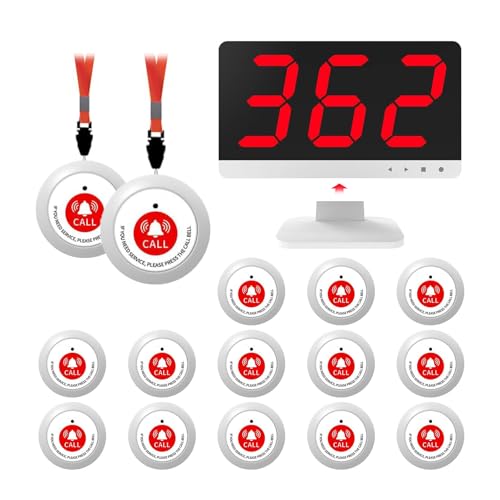
This system features 15 alert buttons and a display receiver, with a range of up to 1000 feet in open space. It’s designed for nurses stations or larger homes, providing stable coverage and clear visual cues when alerts occur. It supports a variety of tones and adjustable volume, making it adaptable to different environments. Best for facilities needing reliable long-range paging and clear room identification.
Who it’s best for: facilities or large homes looking for robust range and display-based alerts. Why selected: strong coverage and easily distinguishable alerts reduce response times. Caution: setup may require initial pairing and configuration to optimize room mappings.
CallToU Caregiver Pager Elderly Alert Call Button System

This system provides three receivers and three call buttons, offering decent multi-zone coverage and flexibility for use around bedrooms, kitchens, or living areas. The neck strap option allows wearable use, and multiple ringtone choices with adjustable volume help tailor alerts to the environment. Best for households that need a balance of mobility and multiple alert points.
Who it’s best for: homes requiring several fixed and portable alert points. Why selected: versatile mounting and wearable options improve accessibility. Caution: open-area range is around 500+ ft; walls and layouts can reduce effective distance.
SavvyMate Nurse Call System With Display Receiver

Equipped with a display receiver and voice announcements, this system helps staff or caregivers respond quickly by identifying the exact call button and location. It supports up to 1000 feet in open space and offers repeated alerts with customizable tones. This makes it ideal for clinics, assisted living facilities, or larger homes with multiple staffers. Best for settings needing precise communication and audible confirmation.
Who it’s best for: facilities requiring visible and audible call confirmations. Why selected: the combination of display and voice prompts reduces response delays. Caution: more complex setup may be needed for initial deployment and room mapping.
PILSAMAS WiFi Caregiver Pager System

This system blends a Wi-Fi hub with 433 MHz transceivers to deliver alerts up to 328 feet through walls. It features a clear alert display on the hub showing who needs help and where, plus an app for remote monitoring. It’s designed for homes and facilities wanting a modern, app-driven approach without ongoing subscription fees. Best for tech-enabled households seeking real-time notifications on mobile devices.
Who it’s best for: users comfortable with smartphones and apps seeking centralized alert management. Why selected: lifetime free updates and local control via the hub plus optional alert channels. Caution: relies on Wi-Fi stability for app notifications; optional plan may be required for SMS or calls.
Buying Guide: Key Purchase Considerations
- Coverage needs: Determine if you need 500 ft, 1000 ft, or more in open space, and whether walls will impede range.
- Usage model: Choose between portable pagers, wall-mounted buttons, or a mix based on resident mobility and care workflow.
- Alert modalities: Consider systems offering display alerts, audible tones, voice announcements, and mobile app notices.
- Scalability: If you have multiple residents, select a system with additional buttons, receivers, or easy upgrade paths.
- Ease of setup: Some systems are plug-and-play, while others require pairing, room mapping, and configuration.
- Durability and environment: IP-rated devices (water/dust resistance) are beneficial in bathrooms or kitchens.
- Power and reliability: Check whether devices run on batteries, wall power, or both; consider backup options for outages.
- Data and alerts: Determine if you need continuous alerts, repeat notifications, or voice/visual confirmations to ensure fast responses.
Frequently Asked Questions
- What is the typical range to expect from these systems?
Most open-area ranges span 500 to 1000 feet, with walls or floors reducing effective distance. - Can these systems support multiple residents?
Yes, several models provide multiple buttons and receivers; check the device count and compatibility. - Do these systems require ongoing subscriptions?
Some options offer lifetime updates or no monthly fees; others may offer optional plans for SMS or email alerts. - Are wearable options available?
Many systems include neck straps or belt clips to wear alert buttons for easy access. - Which features improve response times?
Displays, voice alerts, and clearly named locations help caregivers identify who needs help quickly. - Is Wi-Fi connectivity necessary?
Wi-Fi capable systems rely on internet access for app alerts, while non-Wi-Fi models operate locally via radio transmissions.