Best Wall Arm for TV: Flexible, Long-Arm Mounts for Any Room
Answer: A full-motion long-arm wall mount is ideal for maximizing viewing angles in rooms with limited seating, corner setups, or multi-seat layouts. The top options below fit most 26–75 inch TVs, support up to 100 pounds, and offer extended reach, swivel, and tilt for comfortable viewing from multiple positions. This guide helps buyers choose based on arm length, compatibility, and wall type.
| Product | Brand | Max Weight | VESA Range | Extension |
|---|---|---|---|---|
| ELIVED Long Arm TV Wall Mount | ELIVED | 77 lbs | 100x100mm to 400x400mm | 37.4″ |
| Pipishell Full Motion TV Wall Mount | Pipishell | 77 lbs | 75x75mm to 400x400mm | Variable up to 33″ extension |
| Perlegear Corner TV Wall Mount | Perlegear | 100 lbs | 200x100mm to 600x400mm | 32.37″ extension |
| monTEK Long Arm TV Wall Mount | monTEK | 77 lbs | 75x75mm to 400x400mm | 29″ extension |
| MOUNTUP 37.9″ Long Arm Wall Mount | MOUNTUP | 99 lbs | 150x100mm to 600x400mm | 37.9″ extension |
ELIVED Long Arm TV Wall Mount
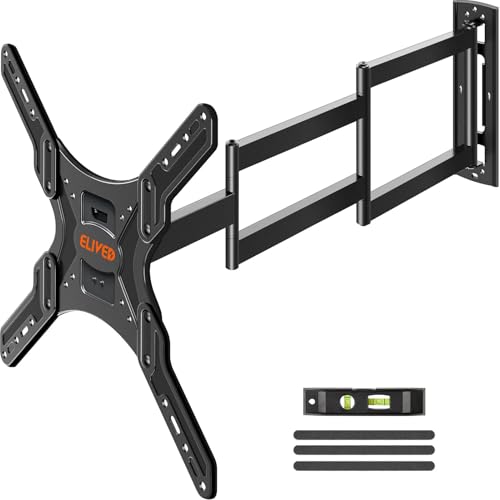
Best for: Corner rooms and viewing from multiple seats. This mount extends 37.4 inches to reach diverse angles and retracts to a slim 3 inches for a clean wall line.
Why selected: It accommodates 26–65 inch TVs with VESA 100x100mm to 400x400mm and supports up to 77 lbs. The single-stud swivel design enables flexible positioning in corners and offers ±90° swivel, ±3° level after installation, and tilt options to reduce glare.
Caution: Verify TV weight, size, VESA pattern, and access to inputs before purchase to ensure compatibility.
Pipishell Full Motion TV Wall Mount

Best for: Broad TV compatibility across 26–65 inches with solid construction for heavier sets. This model supports strong articulation for flexible room viewing.
Why selected: It supports up to 77 lbs with a 33% thicker arm design. Positive features include +5°/-15° tilt and +/-90° swivel with post-install leveling ±4°, helping tailor glare reduction and sightlines. Suitable for wood studs, concrete, and brick walls, not drywall alone.
Caution: Do not mount on drywall alone; ensure wall type supports mounting hardware for heavy TVs.
Perlegear Corner TV Wall Mount

Best for: Corner installation with long reach to cover multiple viewing positions in a room.
Why selected: Supports 37–75 inch screens with VESA patterns from 200x100mm to 600x400mm and holds up to 100 lbs. The 32.37″ extension and 3.12″ wall-retraction offer substantial reach with a tool-free tilt and precise post-install leveling ±4°. UL-listed for added security.
Caution: Do not mount on drywall alone; ensure robust wall construction and proper stud or masonry mounting.
monTEK Long Arm TV Wall Mount
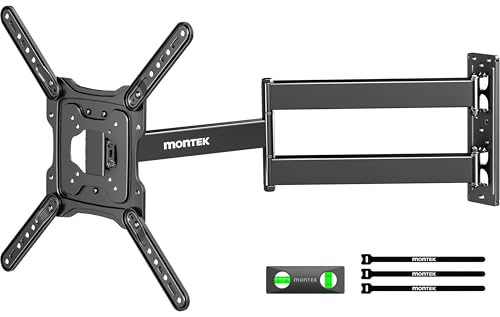
Best for: Users needing a long reach from walls with comfortable multi-seat viewing.
Why selected: Extends 29″ from the wall and retracts to 2.1″. Compatible with 23–65 inch TVs and VESA ranges up to 400x400mm, supporting up to 77 lbs. It offers 180° swivel, ±5°/±3° tilting and leveling after installation, helping lock in the best position while reducing glare.
Caution: Ensure the wall is capable of supporting single-stud installation and verify input access before purchase.
MOUNTUP 37.9″ Long Arm Wall Mount

Best for: Large living rooms or home theaters requiring extended reach and flexible positioning.
Why selected: Universal fit for 42–75 inch TVs with VESA 150x100mm to 600x400mm, supporting up to 99 lbs. The 37.9″ extension provides broad viewing angles, with +5°/-10° tilt, +/-90° swivel, and ±3° leveling. The triple-fold arm design adds flexibility and room-to-room viewing options.
Caution: Confirm wall type and stud spacing; drywall-only installations may require additional reinforcement.
Buying Guide
What to consider when choosing a wall arm for TV
- TV size and weight: Match the mount’s weight capacity and VESA compatibility to your TV’s specifications.
- Extension and retract depth: Longer arms improve viewing from corners or distant seating but may create more space behind the TV; shorter arms save space when needed.
- Wall type and mounting surface: Many mounts require studs, brick, or concrete walls. Do not install on drywall alone unless specified.
- Range of motion: Look for a combination of tilt, swivel, and level adjustments to minimize glare and tailor viewing angles.
- Installation ease: Pre-labeled hardware, clear templates, and tool-free leveling can simplify setup and reduce errors.
- Safety features: UL-listing, locking screws, and secure hinge pins contribute to TV security in high-traffic spaces.
FAQ
- What is VESA and why does it matter?
– VESA is the hole pattern on the back of the TV. Ensure the mount supports your TV’s VESA pattern to ensure a secure fit. - Can these mounts be installed on brick or concrete walls?
– Yes, many models support brick or concrete with proper anchors; drywall-only installations are not recommended for heavy TVs. - What does long-arm extension help with?
– It allows viewing from different rooms or seating arrangements, especially in corner layouts or when you want to pull the TV away for a better angle. - Is a mounting template necessary?
– Yes, it helps align the studs and ensure proper positioning before drilling. - Should I hire a professional for installation?
– For large TVs or complex wall types, professional installation can ensure safety and proper mounting. - Do these mounts affect cable management?
– Some models include cable management features to keep wires neat as the arm extends and retracts.