Best Wall Mounts for Routers and Small Tech Devices in 2026
Answering the need for tidy, space-saving setups, these wall mounts are ideal for routers, cable boxes, modems, and small media devices. Best for renters and homeowners who want quick access, clean lines, and better cable management. The top picks cover universal compatibility, adjustable fits, and simple installation. Below is a short table of the five products chosen for this guide.
| Product | Best For | Key Benefit |
|---|---|---|
| NOTMBESTM Universal Wall Mount Holder | Small speakers, mesh Wi‑Fi systems, smart home hubs | Broad compatibility in a single bracket |
| appacare Cable Box Mount | Cable boxes, modems, small media players | Adjustable height and deep slots for a clean setup |
| Beiyier Cable Box Mount | Streaming devices, DVD players, small boxes | Flexible depth and VESA compatibility |
| TotalMount Universal Mount | Routers, cable boxes, Wi‑Fi devices | Simple universal fit with included hardware |
| SKLK-SEL Cable Box Mount | Apple TV, Roku, Mac mini, modems | Tight dimensions for thin devices and easy install |
Navigate the sections below to compare each product’s features, installation approach, and suitability for your specific devices and space constraints.
NOTMBESTM Universal Wall Mount Holder

This universal wall mount is designed for a broad range of small devices, including Google WiFi, Nest WiFi, Echo devices, HomePod mini, and various mesh systems. It emphasizes compatibility, with a wall shelf that fits devices up to about 4 kg (9 lb). Best for households with mixed devices that you want to store in a single, unobtrusive bracket. A potential limitation is weight: larger devices near the 4 kg limit may require careful mounting for stability.
- Best for: Homes with multiple smart speakers or mesh routers seeking a single storage solution.
- Why selected: Wide compatibility reduces the need for multiple brackets and clutter.
- Caution: Ensure the device weight stays under the 4 kg limit to avoid tilt or failure.
appacare Cable Box Mount

This adjustable wall mount is ideal for cable boxes, modems, and compact media players. It supports adjustable vertical height from 0 to 10 inches, with a flexible length and depth to accommodate different devices. Installation is simple, using included nuts to secure behind a TV or on a wall. Best for: users needing a versatile, behind‑TV mount with customizable height. Limitation: The product notes maximum height but does not specify heavier devices beyond the stated range, so verify dimensions before purchase.
- Best for: An organized behind-the-TV setup with variable device sizes.
- Why selected: Adjustable height provides mounting versatility for various devices.
- Caution: Check your device dimensions to ensure a precise fit within 3.5″-10″ height window.
Beiyier Cable Box Mount

Beiyier offers an adjustable wall mount for small to wide devices, including streaming boxes and DVD players. It supports a vertical height up to 10 inches and a depth range from 1.73″ to 2.95″. The mount allows multiple installation methods and does not obstruct remote control signals, making it suitable for living rooms and entertainment areas. Best for: users needing flexible placement with careful space planning. Limitation: Always confirm device depth to avoid interference with mounting depth.
- Best for: Versatile placement around TVs and media consoles.
- Why selected: Flexible depth and height accommodate a range of devices.
- Caution: Large or unusually shaped remotes may require testing to ensure signal transmission remains uninterrupted.
TotalMount Universal Mount
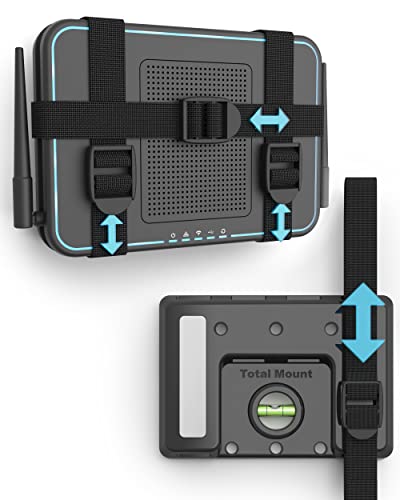
TotalMount presents a USA‑designed universal wall mount for electronics such as cable boxes, routers, modems, and DVRs. It emphasizes a straightforward fit: if the total length around your device is under 37 inches, it should fit. Installation is simple with included hardware and a screwdriver. Best for: a quick, reliable mounting solution for a variety of devices. Limitation: The product relies on universal fit rules; for unusually large devices, verify dimensions before purchase.
- Best for: Quick, uncomplicated installs with standard device footprints.
- Why selected: Clear universal sizing makes it easy to judge compatibility.
- Caution: Measure your device to ensure the total perimeter is under 37 inches for a proper fit.
SKLK-SEL Cable Box Mount

SKLK-SEL offers an adjustable wall mount with a narrow footprint, suitable for devices like Apple TV, Roku, Mac mini, Xiaomi TV Box, and modems. It supports a maximum vertical height of 4 inches and a width of 4.6 inches, with depth between 0.8″ and 1.6″. It is easy to install and can support two installation methods, including wall mounting or using a monitor/TV setup. Best for: thin, compact devices that need a minimal mounting profile. Limitation: Check device thickness and width to ensure compatibility with the bracket’s narrower dimensions.
- Best for: Slim devices where space is at a premium.
- Why selected: Narrow footprint reduces visual bulk on media consoles.
- Caution: Not ideal for thicker devices or those exceeding the 4″ height limit.
Buying Guide: Wall Mounts For Routers And Small Devices
What should I look for in a wall mount?
Compatibility, installation method, and load capacity are top factors. Look for universal designs if you have multiple devices. Check the mounting depth and device height to ensure a proper fit. Consider wall or TV‑mounted options depending on your room layout.
Is adjustable depth and height important?
Yes. Adjustable depth and height give you room to accommodate cables, airflow, and remotes. Devices like cable boxes and streaming players often benefit from flexible mounting to avoid blocked signals and overheating.
What space considerations matter?
Measure vertical height, footprint, and the proximity to power outlets and HDMI ports. A compact, low‑profile mount keeps cables tidy and preserves cabinet or shelf space. For behind-the-TV setups, ensure the mount does not interfere with venting or remote signals.
Are these mounts safe for pets and kids?
Vertical mounting on a sturdy wall or TV stand helps prevent falls if mounted at an appropriate height. Some mounts offer closed or shielded areas to reduce tangling and unintended pulling.
How do I decide between a universal mount and device‑specific option?
Universal mounts offer flexibility across different devices, ideal for households with changing gear. Device‑specific mounts can provide tighter fits and cleaner aesthetics for single device setups. If you rotate devices often, choose a universal option with adjustable features.
Installation tips
- Use the included hardware and verify wall type (drywall, studs, or concrete) before drilling.
- Pre‑measure device dimensions and compare to bracket specifications.
- Leave space for cables and ventilation behind the mounted device.
FAQ
- What devices can these mounts hold?
- Most mounts support small routers, cable boxes, streaming devices, and smart hubs; always confirm dimensions before purchasing.
- Do these mounts require tools to install?
- Yes, most include hardware and require basic screwdrivers; some installs may use a drill for wall anchors.
- Can I mount behind a TV?
- Several options are designed for behind‑the‑TV installation, with adjustable depth and tilt limitations to avoid signal interference.
- Will mounting affect remote signals?
- Most mounts are designed to not obstruct remote signals, but verify clear line‑of‑sight in your space.
- How do I know if my device will fit?
- Check total device dimensions (length, width, height, and depth) against the mount’s stated range.