Best CNC Machine for Acrylic: Top Picks for Precision and Versatility
Choosing the right CNC router for acrylic work requires a balance of rigidity, precision, and upgrade options. This guide highlights five popular CNC machines that excel with acrylic projects, from hobbyist setups to more robust metal and plastic carving. Each option offers solid Grbl-based control, stable frames, and sufficient work envelopes to tackle detailed engravings, signs, and small-batch parts.
The table below summarizes the five selected machines, focusing on suitability for acrylic work, build quality, and upgrade potential.
| Product | Key Strengths For Acrylic | Work Area (approx.) | Notes |
|---|---|---|---|
| Genmitsu CNC 3018-PRO Router Kit GRBL | Upgraded stability, GRBL control, offline option, broad material compatibility | 300 x 180 x 45 mm | Solid entry-level machine with Carveco Maker compatibility |
| LUNYEE 3018 PRO MAX CNC Machine 500W | All-metal frame, long Z travel, powerful spindle potential | 300 x 180 x 80 mm | Heavy-duty design with upgrade paths |
| Genmitsu CNC Router Machine 4040-PRO | Sturdy steel frame, expanded spindle options, enhanced control box | Approximately 15.7” x 15.7” x 3.1” | Versatile with multiple spindle compatibility |
| FoxAlien Masuter Pro | All-metal build, dual rails, versatile spindle compatibility | Standard desktop footprint (varies by model) | Great for beginners and hobbyists with upgrade routes |
| FoxAlien Masuter 3S | Closed-loop motors, high-speed, sturdy 400W spindle | Standard 3-axis desktop size | Excellent precision and control for acrylic work |
Genmitsu CNC 3018-PRO Router Kit Review

The Genmitsu 3018-PRO is a revised all-in-one kit designed for beginners and hobbyists working with acrylic, PCB boards, and soft materials. It uses GRBL control and runs on an Arduino-based controller, offering straightforward setup and reliable motion control. The upgraded base height improves stability, while the 20,000 RPM spindle enables clean cuts in plastics and acrylics. Compatibility with Carveco Maker Cam and other design software helps streamline workflow from design to G-code. This model supports offline operation, which can be convenient for small shops with intermittent internet access.
Key considerations for acrylic work include rigidity, vibration control, and feed rates. The 3018-PRO balances affordability with practical performance. It is particularly well-suited to light engraving, sign making, and decorative acrylic work. While it may require careful clamping of thin sheets, its ecosystem resources and community support help users optimize cuts and feed strategies for acrylic materials.
LUNYEE 3018 PRO MAX CNC Machine 500W

The LUNYEE 3018 PRO MAX emphasizes an all-metal frame and higher Z-axis travel, which gives it more resistance to deflection during acrylic milling. The 500W spindle option provides ample power for cutting thicker acrylic sheets and denser plastics when paired with appropriate feeds. Its 0-12000 RPM range and 5000 mm/min travel speed offer solid performance for hobbyists tackling intricate acrylic designs and small aluminum work as a supplement. The machine’s robust construction supports continued use in projects that demand repeatable accuracy and longer tool life.
For acrylic users, the all-metal design translates to better rigidity, reduced chatter, and more consistent finishes on cleanly cut edges. The upgrade path is appealing for those who plan to expand into metal or heavier plastics while maintaining the same control philosophy and software workflow that beginners expect from desktop CNCs.
Genmitsu 4040-PRO for Metal And Acrylic

The 4040-PRO builds on Genmitsu’s reputation with a robust steel HSS frame and dual Y-axis rails, offering improved stability for larger workpieces and heavier material removal. Its upgraded control box with emergency stop and a 32-bit driver provide dependable performance, while compatibility with 300W and larger spindles expands its capability beyond basic plastics to more demanding materials. The machine’s modular spindle mounts also enable experimentation with different tool types, which can be advantageous when working with acrylic composites and multi-material projects.
For acrylic projects, the 4040-PRO’s larger footprint and stronger frame reduce deflection, resulting in crisper edge finishes and consistent engraving depths. The device is well-suited to small production runs and sign making where acrylic sheets are common, with enough capability to handle occasional metal or composite inserts as needed.
FoxAlien Masuter Pro: All-Metal 3-Axis
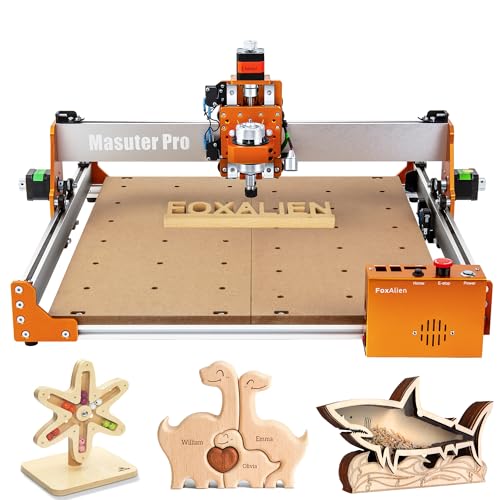
The FoxAlien Masuter Pro pairs a sturdy all-metal frame with enhanced stability, making it a strong option for acrylic engraving and light milling. Its upgraded dust-proof controller and safety features support safer operation in home workshops. The Masuter Pro ships with two spindle clamps and supports customization, allowing users to adapt the tool to different spindle sizes and projects. This flexibility is useful for acrylic work that requires different depths of cut or multi-pass engraving with varying bit profiles.
In practice, the Masuter Pro is suitable for beginners who want reliability and room to grow. The metal frame reduces flex during aggressive passes, which helps maintain consistent edge quality on acrylic parts and signs. Users can start with standard acrylic jobs and scale up to more complex designs as they gain experience with feed rates, tool selection, and clamping strategies.
FoxAlien Masuter 3S: High Precision 3-Axis
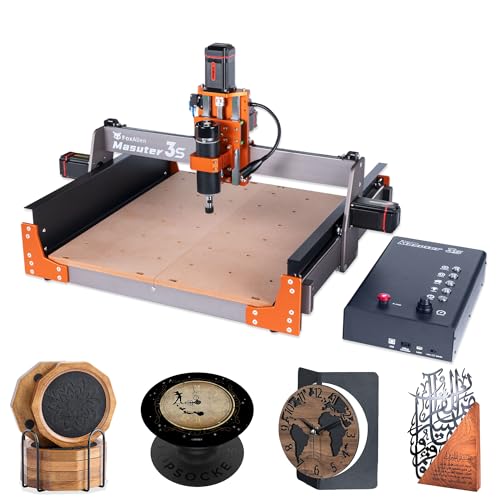
The Masuter 3S employs closed-loop NEMA 23 motors with a powerful 400W spindle, delivering precise control with reduced missed steps and high torque. Its rigidity comes from the all-metal framework and dual rails that support smooth motion across the X, Y, and Z axes. The combination of high torque, fast travel speeds, and stable construction makes it well-suited for acrylic cutting and engraving tasks that demand repeatability and cleaner edge finishes. The 3S model is a strong choice for hobbyists who want better control without stepping into industrial-grade equipment.
Buying Guide: Key Purchase Considerations For Acrylic Projects
When selecting a CNC router for acrylic, buyers should assess rigidity, spindle power, and control capabilities. Acrylic can crack if cut too aggressively or with excessive vibration, so a stable frame, quality rails, and an appropriate spindle speed are essential. Consider the following factors to compare options effectively:
- Frame rigidity and materials: All-metal frames provide better stability and reduced deflection during cutting and engraving in acrylic.
- Spindle power and speed: Higher wattage spindles with broad RPM ranges enable cleaner cuts in thick acrylic sheets and allow faster material removal for plastics.
- Working area: Choose a size that matches your typical project scale—larger areas enable signs and larger panels, while compact boards fit desk setups.
- Control system and software: GRBL-based controllers with offline operation options simplify workflow, especially for small shops without continuous internet access.
- Upgrade paths: Machines that support different spindles, linear rails, and additional clamps provide longer-term value as skill and project complexity grow.
- Community and support: A strong user community and developer resources help resolve issues related to acrylic finishing, feed rates, and tool selection.
- Safety and ease of use: Features such as emergency stop, dust control, and easy access controls contribute to safer operation in hobby spaces.
For acrylic-specific tasks—such as sign making, decorative panels, and precise engravings—prioritize models with rigid frames, efficient heat dissipation, and stable motion systems. The five highlighted machines offer a spectrum of capabilities, from entry-level setups to more rugged, upgrade-friendly options, enabling you to pick a solution that aligns with your budget and long-term goals.
To maximize acrylic results, consider pairing your CNC with appropriate engraving bits, high-quality clamps, and a dust-control plan. Slow, multiple passes can improve edge finish, while a well-secured workpiece minimizes vibration. Regularly check alignment and calibration to maintain consistent depth and texture across projects.