Best Desktop CNC Machines for Home Hobbyists
Whether you’re engraving wood, plastics, or soft metals, a desktop CNC machine can transform your DIY space into a precision workshop. This guide highlights five top options that balance ease of use, accuracy, and expandability for beginners and intermediate makers. Each pick includes key features to help you compare performance, setup, and potential upgrades.
| Product | Brand | Key Benefit | Ideal For |
|---|---|---|---|
| Carvera Air Desktop CNC Machine | MAKERA CARVERA | Quick tool changer, compact enclosure | Small projects, beginners, hobbyists |
| Carvera Air Desktop CNC Machine with 4th Axis | MAKERA CARVERA | 4th axis expansion, 10-second tool changes | Multi-axis creativity, advanced projects |
| Genmitsu Cubiko CNC Router | Genmitsu | Plug-and-play with auto Z-probing | Beginner to intermediate, woodworking |
| Genmitsu 3020-PRO MAX V2 | Genmitsu | Upgraded frame, enclosed layout | Stable, versatile desktop milling |
| SainSmart Genmitsu 3018-PROVer V2 | SainSmart | Great value, easy assembly | Absolute beginners, gifts, kits |
Carvera Air Desktop CNC Machine — Compact 3-Axis Milling
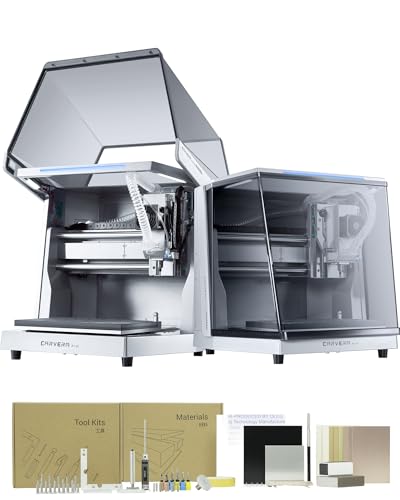
The Carvera Air from MAKERA CARVERA is a compact, enclosed desktop CNC mill designed for precise carving, milling, and engraving on a variety of materials. It features a 11.8″ x 7.9″ x 5.1″ work area within a fully enclosed footprint that minimizes noise, dust, and debris. An intuitive CAM and software ecosystem supports quick project setup, while the tool changer enables fast transitions between tasks. Optional 4th axis and laser compatibility broaden capability for more complex shapes and cylindrical work.
Key features include a quick tool-changing system that completes transitions in about 10 seconds, auto probing and leveling for consistent depth control, and the option to expand with additional axes and laser modules. This makes it suitable for hobbyists exploring multi-material, multi-axis projects in a compact workspace.
Ideal for: beginners who require a safe, enclosed environment and a straightforward workflow, as well as makers who want a compact platform for intricate 3-axis milling and engraving.
Carvera Air Desktop CNC Machine With 4th Axis

This Carvera Air model expands the existing platform with a true 4th axis, enabling cylindrical machining, double-sided objects, and advanced 3D forms. The rotary work area accommodates longer cylindrical pieces, and the system continues to feature a quick tool changer and an all-in-one CAM software for simplified project flow. It’s a strong pick for users who want to push beyond basic 3-axis capabilities without moving to a much larger machine.
Key benefits include seamless tool changes in 10 seconds, robust closed-loop control, and the potential for rotary machining. It remains suitable for wood, plastics, and some metals depending on spindle and setup. This option is well-suited for advanced hobbyists seeking expanded geometry in a compact footprint.
Carvera Air with 4th Axis Add-on Module

This variant mirrors Carvera Air’s core value while highlighting the 4th axis module’s practical benefits, including enhanced rotational machining for more complex 3D models. The system supports fast tool changes and an all-in-one CAM workflow, making it a compelling choice for makers who want to experiment with cylindrical parts, double-sided components, and nuanced engravings in a single compact unit.
Considerations include ensuring compatibility of the 4th axis with your intended materials and projects, as well as verifying software support and spindle capacity for your typical workpieces. It’s a strong candidate for those who want increased design flexibility without a heavy equipment upgrade.
Genmitsu Cubiko CNC Router Machine with Enclosure
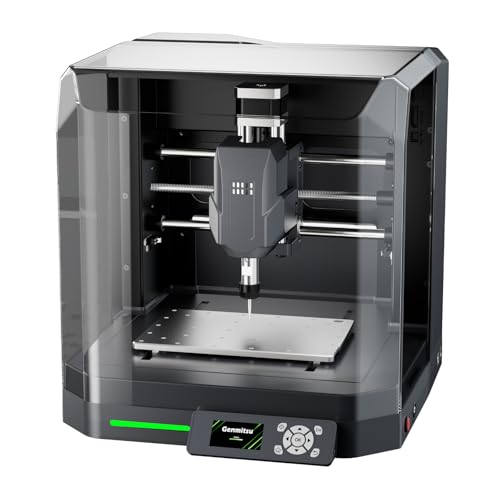
Genmitsu Cubiko is a ready-to-use desktop CNC router that emphasizes simplicity and reliability. It ships with a protective enclosure, automatic Z-probing, and app-based control, making it approachable for beginners. It supports popular software ecosystems such as Fusion 360, Easel, Candle, and Carveco, with tutorials to guide first projects in wood, acrylic, and even some metals. The automatic tool height adjustment helps ensure consistent results across varying material thicknesses.
Key strengths include plug-and-play readiness, smart surface adjustment for non-flat materials, and the convenience of automatic tool height adjustment. This makes Cubiko a strong all-around option for learners who value a clean, user-friendly setup alongside practical performance.
AnoleX CNC Router Machine 4030-Evo Ultra 2

The AnoleX 4030-Evo Ultra 2 emphasizes all-metal construction with dual steel linear guides and ball screws for higher precision and rigidity. With an 800W trim router, it targets metal, aluminum, brass, and wood workpieces, presenting powerful capabilities for a desktop platform. The Grbl_ESP32-based control firmware supports GRBL 1.3a features, including closed-loop motors, laser engraving, and rotary axis expansion, which broadens potential applications beyond basic milling.
Notable considerations include ensuring adequate dust management and a stable power supply for heavier tools. The combination of robust mechanics and flexible control makes this a strong choice for users looking to tackle more demanding projects on a compact machine.
FoxAlien Masuter Pro 3-Axis CNC Router
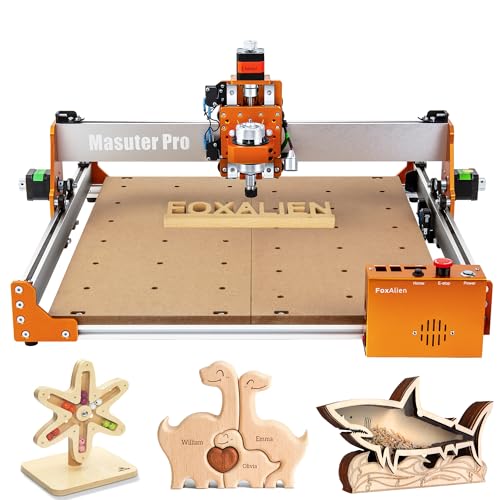
The FoxAlien Masuter Pro combines an all-metal frame with a durable Z-axis guided by linear rails, delivering dependable precision for engraving and cutting on wood, acrylic, MDF, and more. It includes adaptable spindle clamps to accommodate different spindles (52mm and 65mm), with options to upgrade to higher-power spindles for more aggressive cutting. The controller is designed with dust protection and safety controls in mind, supporting straightforward operation for hobbyists and educators alike.
Considerations include compatibility of spindles and the level of dust management you need, as well as the balance between price and performance for your target materials. It’s a solid entry for those seeking a robust, upgrade-ready platform with clear expansion paths.
Genmitsu 3020-PRO MAX V2 CNC Router

The Genmitsu 3020-PRO MAX V2 strengthens its platform with a robust 4040 Y-axis frame, a one-piece machined spoilboard with measurement scales, and an upgraded dual steel X-axis guide rail. The new Z-axis assembly and enclosed design improve stability and safety, while a pre-assembled XZ gantry reduces setup time. The backplate wiring, pre-organized components, and drag chain further streamline assembly for immediate CNC operation.
Key advantages include improved rigidity, straightforward assembly, and a compact footprint that suits demonstrated workflows in hobby projects, signmaking, and light desktop milling. It’s well-suited for users who want a dependable, upgrade-friendly machine with strong baseline performance.
SainSmart Genmitsu 3018-PROVer V2 CNC Router

The 3018-PROVer V2 is positioned as an excellent entry-level CNC with a clear upgrade path. It comes with pre-assembled main parts, including a one-piece aluminum spoilboard, plus clear cable management to simplify initial setup. The kit encourages expanding capability with accessories such as an offline controller, higher-powered spindles, or extension kits. Tutorials support beginners stepping into CNC machining for wood, acrylic, and plastics.
Highlights include value for money, ease of assembly, and room to grow into more complex tasks. This makes it a popular choice for students, hobbyists, and first-time CNC operators seeking a reliable learning platform that can evolve with skills.
Buying Guide: Key Purchase Considerations for Desktop CNC Machines
- Intended materials: Wood, plastic, aluminum, and light metals each demand different spindle power, feed rates, and rigidity. Choose a machine with a spindle and frame suited to your typical projects.
- Workspace and footprint: Enclosures improve safety and cleanliness but increase overall size. Measure your space and consider enclosure needs if you’re working near pets or kids.
- Accuracy and repeatability: Look for robust linear rails, ball screws, and rigid frames. Closed-loop motors and auto-probing features help maintain consistent results across sessions.
- Software ecosystem: Ensure compatibility with your preferred CAM software (e.g., Fusion 360, Easel, Carveco). All-in-one CAM offerings and auto-probing can reduce setup time for new projects.
- Upgrade paths: Some models offer 4th axes, laser attachments, or offline controllers. Plan for future expansions if you anticipate more complex designs.
- Safety and noise: Enclosures reduce noise and dust; consider a model with built-in safety features and adequate ventilation for longer sessions.
- Community and support: A strong user community and accessible customer support can help with quick troubleshooting and project ideas as you learn.
- Budget vs. value: More expensive units often provide greater rigidity and expansion options. Balance upfront cost with your planned project scopes and learning goals.
Selecting the right desktop CNC machine involves balancing initial setup, material compatibility, and future growth. The options listed above cover a spectrum from beginner-friendly to more capable setups, offering pathways for skill advancement while staying within a compact footprint.