Best Digital Locks for Airbnb: Secure, Convenient Access for Hosts
Finding the right digital lock for an Airbnb property involves balancing guest access, setup ease, and ongoing security. This guide reviews five top-rated options that blend fingerprint, passcode, and smart features to streamline check-ins, protect keys, and reduce guest handoffs. Each product below highlights key strengths for short-term rentals, helping hosts choose a reliable solution that fits their doors and occupancy patterns.
style=”display:none;”>Summary Table of Selected Products
| Product | Brand | Access Options | Ideal For |
|---|---|---|---|
| Keyless Entry Fingerprint Smart Lock | Sifely | Fingerprint, Passcode, Smartphone, Card, Fob | Hosts needing quick on-site/universal access |
| Populife Smart Lock Box | Populife | PIN, App, Fingerprint, NFC Card | Secondary access for guests, offline operation |
| Schlage Encode Smart Deadbolt | Schlage | WiFi, App, Voice (Alexa/Google), Codes | Remote host monitoring and guest code management |
| Kucacci Keyless Door Lock | KUCACCI | Fingerprint, Passcode, App, Fob, Key, WiFi (gateway) | Flexible control for multi-user access |
| Yamiry Smart Door Lock | Yamiry | Fingerprint, App, Passcodes, Keys, Alexa | Versatile unlocking with remote management |
Keyless Entry Fingerprint Smart Lock With Handle & Keypad — Sifely

Among the top choices for rental hosts, this Sifely lock combines a biometric fingerprint reader with passcode, wireless fob, card, smartphone, and traditional key options. It is designed for quick guest access without internet connectivity, making it suitable for properties with variable internet access. Installation is straightforward, requiring only a Phillips screwdriver, and the door handle is reversible for left- or right-handed doors. Battery life can extend up to a year on four AA batteries, reducing maintenance visits.
Populife Smart Fingerprint Lock Box for Keys with Code

The Populife lock box is a practical add-on for hosts who want a backup access solution without altering door hardware. It supports multiple unlock modes (PIN, App via Bluetooth, fingerprint, NFC card, and mechanical key) and is managed through the POPULIFE app. It’s especially useful for real estate agents, property managers, or hosts who occasionally need to provide access for cleaners or maintenance staff without sharing physical keys.
Schlage Encode Smart WiFi Deadbolt — Front Door

Schlage Encode integrates built-in WiFi for remote access and monitoring through the Schlage Home app. It supports up to 100 access codes, customizable notifications, and easy management of multiple locks. It also offers compatibility with voice assistants like Alexa and Google Home, which can streamline check-ins for guests who prefer hands-free control. This lock is well-suited for hosts who want robust remote management capabilities and simple guest code distribution.
Kucacci Keypad Smart Door Lock — 5-in-1 Access

The Kucacci option emphasizes ease of installation and broad compatibility. It supports fingerprint, passcodes, app access, key fob, keys, and optional WiFi via a gateway. The installation is DIY-friendly and takes about 10 minutes, fitting standard door sizes. The app-based management allows hosts to authorize admins, create codes, share e-keys, and view unlock activity, making it a strong choice for Airbnb setups with multiple guests and co-hosts.
LinkThai Smart Door Lock With Knob

The LinkThai model combines a 5-in-1 unlocking system with a straightforward installation process. It provides app control, Bluetooth proximity unlocking, a backlit keypad, and the option to generate one-time guest codes. The product emphasizes user-friendly management through its app and supports remote operation when connected with compatible gateways. It appeals to hosts who desire flexible guest access and simple, scalable installation across multiple listings.
Master Lock Digital Lock Box for Keys
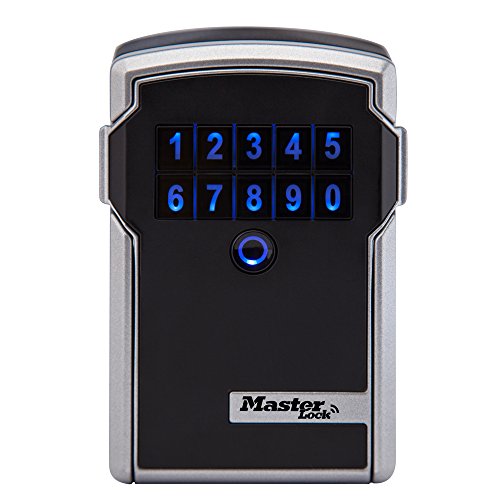
This wall-mounted key box is ideal for storing keys or access cards securely in a shared entry area. It supports Bluetooth and keypad codes for temporary or permanent access, and its weather-resistant design suits outdoor or indoor use. It’s a practical backup or alternative access solution for hosts who want a reliable, low-maintenance option that doesn’t require changing door hardware or host presence during check-in.
Buying Guide
- Access Methods: Consider whether you need fingerprint, keypad, app-based, Bluetooth, or WiFi-enabled access. 5-in-1 options offer maximum flexibility for guests and service staff.
- Installation and Compatibility: Check door types, backset compatibility, and whether the lock requires drilling or a gateway for app/remote access. DIY installation is a major time-saver for hosts managing multiple properties.
- Remote Management: If you host remotely or manage multiple listings, prioritize locks with robust mobile apps, access logs, and easy code distribution without locksmith visits.
- Battery Life and Maintenance: Battery-powered models reduce the need for frequent servicing. Look for devices with long battery life and audible low-battery alerts.
- Security Features: Look for tamper alerts, anti-peep keypad designs, encryption standards, and the ability to revoke access instantly for guests or staff.
- Backup Access: Devices with multiple unlock options (e.g., keypad, fingerprint, app, physical key) provide peace of mind during device or power failures.
- Weather and Durability: For exterior doors, choose weather-resistant enclosures and durable materials to withstand rust or corrosion.
- Guest Experience: A seamless guest check-in reduces friction. Systems with automated codes or temporary access windows improve satisfaction and turnover.
- Pricing and Support: While prices vary, consider ongoing support, firmware updates, and warranty coverage to protect the investment over time.
These considerations help hosts align their choice with property type, guest flow, and maintenance capacity, ensuring secure, convenient access for every stay.