Best Klipper 3D Printer: High-Performance, Speedy, and Precise Models
Klipper firmware is prized for improved printing speed, smoother motion, and advanced features that unlock higher performance from consumer 3D printers. The following picks showcase printers and Klipper-enabled accessories that are well-suited for American makers seeking speed, precision, and reliability. Each entry includes core capabilities, build size, and notable features to help you compare at a glance.
Product Summary
| Product | Brand | Key Klipper Benefits | Build Size |
|---|---|---|---|
| ELEGOO Neptune 4 Pro | ELEGOO | Klipper firmware with 500 mm/s speeds, upgraded all-metal rails, dual heating zones | 225x225x265 mm |
| IdeaFormer-3D IR3 V2 Conveyor Belt Printer | IdeaFormer-3D | Continuous Z-axis via rolling belt, auto-leveling, wide filament compatibility | 250x250x∞ mm |
| Creality Sonic Pad Klipper | Creality | Integrated Klipper with input shaping and high-speed smoothing | Depends on connected printer |
| QIDI MAX3 3D Printer | R QIDI TECHNOLOGY | Klipper firmware, CoreXY, auto leveling, large, fast-format printing | 325x325x315 mm |
| BIGTREETECH Pad 7 Klipper | BIQU | Pre-installed Klipper, strong computing, wide printer compatibility | Depends on connected printer |
ELEGOO Neptune 4 Pro 3D Printer

The ELEGOO Neptune 4 Pro integrates Klipper firmware with a powerful processor to push printing speeds up to 500 mm/s. Upgraded X and Y axis all-metal guide rails with U-shaped wheels reduce drag and improve precision. The printer offers a compact 225x225x265 mm build volume with segmented heating zones to optimize power use and heating speed. This setup targets users seeking rapid prototyping without sacrificing print quality.
IdeaFormer-3D IR3 V2 Conveyor Belt Printer
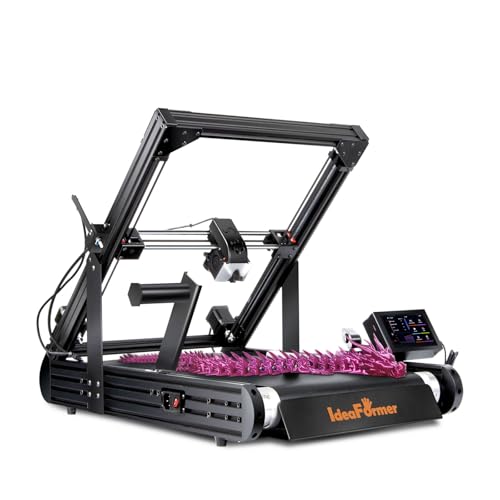
The IR3 V2 uses an endless rolling conveyor belt to enable continuous Z-axis printing, ideal for long or batch projects. A durable PEI-coated belt ensures strong layer adhesion across filaments like PLA, PETG, ABS, TPU, and more. Auto-leveling with a Y-offset sensor eliminates manual bed calibration, providing faster setup and reduced maintenance for high-volume manufacturing or consistent prototyping runs.
Creality Sonic Pad Klipper

The Creality Sonic Pad Klipper harnesses Klipper firmware to boost print speed while maintaining quality. Its built-in input shaping helps mitigate resonance during fast moves, stabilizing outputs. Compatible with a wide range of Ender printers via USB, and updatable through OTA or USB, the Sonic Pad offers a powerful control solution for Klipper-driven workflows.
QIDI MAX3 3D Printer

The QIDI MAX3 pairs a large 12.8×12.8×12.4-inch build volume with fast Klipper-enabled performance and CoreXY mechanics. It offers fully auto leveling and a 65°C chamber, making it suitable for high-precision, high-speed manufacturing of larger parts. The printer emphasizes stability, durable framing, and broad material compatibility, including reinforced filaments.
BIGTREETECH Pad 7 Klipper

The BIGTREETECH Pad 7 Klipper screen pre-installs Klipper firmware, offering improved print speed via input shaping and an ADXL345 accelerometer for resonant frequency measurements. Its 64-bit CB1-based computing platform powers advanced features, and it supports a broad array of printers with OTA or USB-based updates, enabling flexible Klipper enhancements across setups.
Buying Guide: Klipper-Ready Purchase Considerations
Choosing a Klipper-enabled printer or accessory requires evaluating how you plan to use it. Consider build volume, print speed versus accuracy, cooling capabilities, and the availability of auto-leveling. For larger parts or serial production, a conveyor belt approach may boost throughput, but requires robust calibration workflows. If you already own Ender, CR-10, or similar platforms, a Klipper-compatible pad or controller can unlock new performance without replacing the entire machine. Always verify compatibility with your preferred slicer and filament types before purchasing.
Key considerations include:
- Firmware and control hardware: Ensure the device ships with Klipper pre-installed or is easily upgradeable, with stable firmware updates.
- Motion systems: All-metal rails, belt drives, and CoreXY arrangements influence speed and vibration; assess your tolerance for noise and heat.
- Thermal management: Independent heating zones and heated beds impact print stability and print speed, especially with large builds.
- Auto-leveling and calibration: Auto-leveling reduces setup time; look for YAML-based or sensor-driven solutions for consistent beds.
- Filament support: Wallet-friendly filaments like PLA/PETG vs advanced materials may require stronger extruders or direct-drive options.
- Expandability: Consider future upgrades such as Advanced sensors, input shaping modules, or additional display panels.
In sum, the best Klipper setup depends on your balance of speed, precision, and build size. The options above cover a spectrum—from compact, high-speed units to larger, production-oriented platforms—each enabling Klipper advantages in different ways.