Best Privacy Screen for Desk: Top 5 24-Inch Monitor Privacy Shields
Protect sensitive information and reduce distractions at work or home with high-quality privacy screens designed for desks and monitors. This article highlights five strong options that fit standard 24-inch or larger desk setups, offering features like anti-glare, blue light reduction, and easy installation. Each pick is evaluated on privacy effectiveness, build quality, and ease of use to help you choose the right solution for your workspace.
Summary of Selected Products
- Peslv 24-Inch Privacy Screen for Monitor (2-Pack) – 24″ privacy filter with ±30° privacy angle, 2 mounting options
- Kensington 24-Inch Privacy Screen – 16:9, anti-glare blue-light reduction, matte/glossy reversible
- Mamol 24-Inch Privacy Screen (2 Pack) – microlouver privacy, blue light reduction, anti-scratch
- COREMINDED Universal Desk Privacy Panel – heavy-duty desk divider, 48″ x 24″, adjustable mounting
- OBEX Acrylic Free Standing Screen – 24″ x 24″, frosted, portable desk partition
Peslv 24-Inch Privacy Screen (2-Pack) for Monitors

The Peslv privacy filter is designed for 24-inch monitors with a 16:9 aspect ratio. It supports compatible brands such as Dell, HP, Samsung, Lenovo, and more. The product emphasizes privacy with a light-blocking technology that shields screens from side viewing within ±30°. It includes two installation options to accommodate monitors with raised bezels or full-screen designs, and claims quick setup in about nine seconds.
Key features include the specified dimensions: width 20 15/16″ (532 mm), height 11 13/16″ (299 mm), diagonal 24″ (609.6 mm). The filter is marketed to reduce glare and protect against shoulder-surfing, while allowing straightforward mounting for versatile desk setups. Buyers should verify screen measurements beyond the diagonal to ensure a proper fit.
Kensington 24-Inch Privacy Screen

The Kensington privacy screen focuses on restricting side viewing to about ±30°, helping protect confidential data in busy offices. It also reduces blue light exposure by up to 30% and uses an anti-glare coating to minimize reflections. The product is designed for 24-inch widescreen monitors and offers a reversible feature—matte for reduced glare and glossy for enhanced clarity and privacy, depending on lighting and usage needs.
This option emphasizes a balance between privacy and screen clarity, making it a versatile choice for shared workspaces. As with all privacy filters, users should measure the actual screen bezel and diagonal to confirm compatibility and ensure the filter sits properly without obstructing on-screen content.
Mamol 24-Inch Privacy Screen (2 Pack)

The Mamol privacy filter comes in a 24-inch size compatible with many brands like HP, Samsung, Dell, Lenovo, and more. It employs microlouver technology to limit viewing angles to around 30 degrees and blackout near 60 degrees for enhanced privacy. The screen is designed to reduce eye strain and filter up to 99.9% of UV light while suppressing blue light by about 98%, contributing to better eye comfort during long work sessions. The product offers a reversible surface with a glossy side for clarity and a matte side to minimize glare.
With a 2-pack option, Mamol provides flexibility for multiple screens or backup coverage. Potential buyers should confirm the width and height to ensure the fit matches their monitor precisely, especially for users evaluating unconventional bezel designs.
COREMINDED Universal Desk Privacy Panel
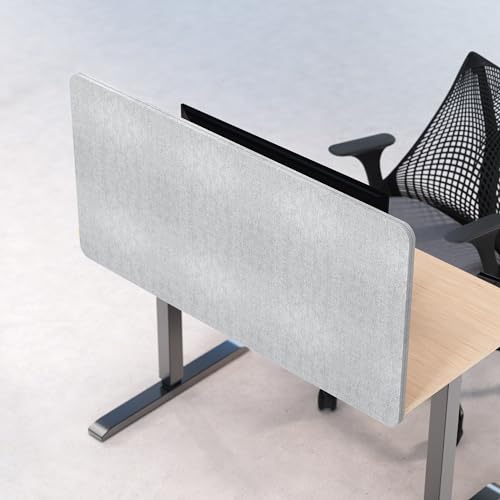
The COREMINDED desk privacy panel is a heavy-duty option designed for larger desk setups. It uses a combination of clamps and stand mounts to fit a wide range of desk types, including those with unusual frame designs. The panel features high-density PET material for improved sound absorption (NRC 0.8–0.85) and a thickness of 24 mm, contributing to better privacy and a quieter workspace. It is available in multiple sizes and includes a cable management slot to keep cords orderly.
Designed for versatility, this panel aims to maximize privacy without permanently altering furniture. It suits shared offices, studios, and classrooms where modular privacy solutions are preferred. When choosing this option, ensure your desk dimensions align with the panel’s width and height, and consider whether you need clamps, stands, or both for installation.
OBEX Acrylic Free Standing Screen

The OBEX acrylic screen is a freestanding desk partition measuring 24″ x 24″ in frosted or clear variants. Its freestanding design enables placement on a desk without mounting, making it a portable privacy solution for shared workspaces, classrooms, or showrooms. The panel includes a sturdy mounting mechanism with rubber-padded feet to prevent sliding and protect surfaces. Acrylic material provides a clear view from the front while maintaining a physical barrier from side viewing.
Ideal for temporary setups or spaces that require quick reconfiguration, this option prioritizes portability and ease of use. Review your desk surface to verify the panel’s footprint and ensure the stand supports the intended orientation and stability during daily tasks.
Buying Guide: Key Considerations For Desk Privacy Screens
- Screen size and fit: Measure width, height, and diagonal to ensure a precise fit for your monitor. Some brands provide explicit dimensions; others require careful cross-checking with bezel design.
- Privacy angle: Most filters restrict viewing to ±30°. If you work in high-traffic areas, a stronger privacy angle may be desirable to prevent side glances.
- Blue light and glare reduction: Look for filters that reduce blue light and glare to protect eyes, especially during long work sessions or late-night work.
- Material and finish: Options include matte or glossy finishes. Matte reduces reflections and glare, while glossy can offer clearer image quality but less glare control.
- Installation method: Some filters mount with clips or rails; others are freestanding or desk-mounted. Consider whether you need a temporary or permanent solution, and whether multiple monitors require identical filters.
- Portability and reusability: Freestanding acrylic panels offer mobility, while hard-filter glass or polycarbonate screens may be more durable but less portable.
- Sound privacy: While primarily a visual barrier, heavier panels and dense materials can provide some sound dampening, useful in noisy environments.
- Durability and care: Check for anti-scratch coatings and ease of cleaning to maintain clarity over time.
- Compatibility: Confirm the monitor model, bezel design, and any mounting options (raised bezels vs. bezel-less screens) before purchasing.
- Cost vs. coverage: Compare multi-pack options (e.g., 2-pack) against single screens for value, especially if you manage multiple workstations.
When selecting a desk privacy screen, balance privacy needs with usability. Consider whether you need a portable, freestanding option for a flexible workspace or a mounted solution for a fixed, distraction-free environment. For shared offices, a robust privacy angle and durable build may be prioritized, while home setups may benefit from dual-pack options for multi-monitor configurations or future expansion.