Best PWM Fan Controller for Quiet, Efficient Cooling Solutions
Are you seeking precise, reliable control of PC fans to optimize cooling and minimize noise? This guide focuses on high-quality PWM fan controllers and hubs that distribute and regulate airflow across multiple fans. We compare features, compatibility, and power handling to help you choose a setup that fits your build—from compact builds to expanded cooling rigs.
Summary of chosen products
| Product | Brand | Type | Key Feature |
|---|---|---|---|
| Noctua NA-FC1 | Noctua | 4-pin PWM controller | Manual speed control with “No stop” mode |
| IS ICSTATION PWM Controller | IS | 4-wire with temperature probe | Automatic/Manual modes with temp data |
| ARCTIC Case Fan Hub | ARCTIC | 9+ fan distributor with SATA power | Synchronous PWM, simple cable management |
| ASUS TUF ARGB PWM Hub | ASUS | Six fans + RGB hub | Cooling and lighting sync, indicators |
| Noctua NA-FH1 | Noctua | 8-channel fan hub | PWM distribution with safety fuses |
Noctua NA-FC1, 4-Pin PWM Fan Controller

The Noctua NA-FC1 provides a compact, highly flexible solution for 4-pin PWM fans. It can operate as a manual speed reducer or work with automatic motherboard control to achieve quiet operation even with high-speed PWM fans. A notable feature is the “No stop” mode, which prevents the fan from dropping below 300 RPM to avoid BIOS fan errors. This makes it suitable for compact builds or situations where silence is essential without sacrificing cooling performance.
4 Pin 12V PWM Fan Controller 6 Fans Supported

This OwlTree hub supports up to six 4-pin PWM fans and offers flexible power inputs from SATA and DC 12V. It provides a maximum total power of 60W (5A at 12V), with individual ports handling up to 2A. It is ideal for multi-fan setups where space is at a premium and simple power routing is needed, though it is not compatible with 3-pin or 2-pin fans.
IS ICSTATION DC 12V PWM 4-Wire Fan Speed Controller

This 4-wire PWM controller from ICSTATION combines automatic and manual fan speed control with a digital display showing temperature and RPM. It includes a temperature probe and uses a 100 RPM granularity, capable of displaying up to 30,000 RPM. The dual-mode operation supports both automated cooling and user-driven adjustments for custom cooling profiles in demanding environments.
4 Pin 12V PWM Fan Controller With Type C USB Power

This OwlTree unit adds Type-C USB power input with a 4-pin 5-way PWM hub. It includes 12V output for PWM fans and a built-in DC-DC booster to drive 12V signals. It supports a maximum output that scales with the power available from the Type-C input, making it versatile for modern builds that leverage USB-C power adapters. It is best for users needing USB power flexibility in addition to PWM control.
ARCTIC Case Fan Hub – 10-fold PWM Distributor
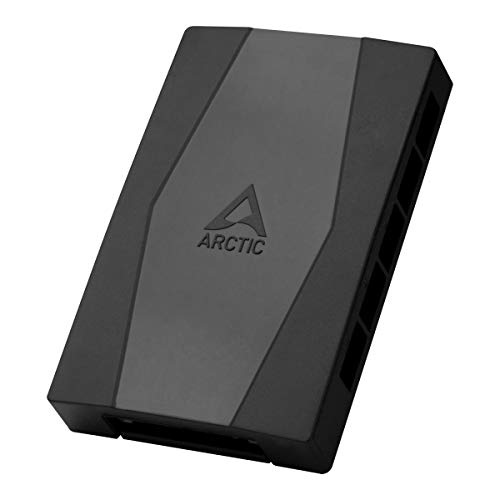
ARCTIC’s Case Fan Hub expands ventilation by adding nine more fan slots while enabling synchronous PWM control. It is designed to be placed inside the case and connected to the motherboard with a single cable, reducing cable clutter. The hub transmits the PWM signal to connected fans, and its RPM readings help monitor cooling performance. The setup is well-suited for larger cases or multi-fan builds requiring centralized PWM management.
12V 4 Pin PWM Fan Speed Controller PC Hub

This OwlTree hub supports six 4-pin PWM fans with power inputs from Type-C PD3.0 or DC 5.5×2.1mm. It offers a 60W total output and individual ports capable of 2A, making it a flexible option for builds that rely on USB-C power delivery or PD-capable adapters. The device uses a 5V input to boost to 12V for PWM signaling, enabling broader compatibility with different fans.
ASUS TUF Gaming ARGB PWM Fan Hub

ASUS TUF Gaming ARGB PWM Hub connects up to six fans and includes RGB synchronization for a cohesive lighting effect. It supports PWM control and provides visible power and operation indicators for easy status checks. This hub is ideal for gamers and enthusiasts seeking integrated cooling and lighting management with straightforward setup.
Noctua NA-FH1, 8 Channel Fan Hub

Noctua’s NA-FH1 8-channel fan hub distributes PWM signals to multiple fans while supporting up to eight 4-pin PWM or 3-pin fans. It features safety fuses for protection against overcurrent and short circuits and can power a large number of 12V fans via SATA power, plus 4-pin inputs for additional RPM monitoring. It is a strong option for large builds needing reliable PWM distribution with built-in safeguards.
Buying Guide: Key Purchase Considerations
Power handling and fan compatibility are central when choosing a PWM controller. Consider the number of fans you plan to run, whether you need 3-pin compatibility, and the total wattage your hub can safely deliver. For silent systems, look for features like programmable profiles, temperature-based speed control, and dedicated safety protections (fuses, short-circuit prevention).
Design and integration also matter. Some hubs are designed to sit inside the case with a clean cable layout, while others focus on USB-C power input flexibility or RGB syncing. If you require synchronized lighting as well as cooling, a hub with RGB control or motherboard integration can simplify setup. Compatibility with your motherboard’s PWM signals is essential to avoid miscommunication between components.
Power source considerations vary. SATA-powered hubs are convenient for desktop builds, but ensure your power supply can provide adequate current. USB-C powered options may require compatible adapters and careful attention to total wattage. For large builds with many fans, a hub with a high total wattage and per-port current limits helps prevent voltage drops and PWM glitches.
Reliability and cooling performance are key. Reputable brands like Noctua, ARCTIC, and ASUS offer robust protection and long-term stability. If your environment features aggressive airflow or high ambient temperatures, choose a controller with precise RPM readouts and stable PWM signaling to maintain consistent cooling without unexpected fan noise.