Best Smart Front Door Lock With Handle for 2025
Smart front door locks with handles combine convenience, security, and stylish design for modern homes. This guide highlights five top options, including app control, multiple unlock methods, and auto-lock features, so you can compare features side by side and choose the best fit for apartments, houses, or offices.
Summary of chosen products (by key capabilities):
| Product | Brand | Unlock Methods | Smart Features | Special Notes |
|---|---|---|---|---|
| VE06-H Smart Front Door Lock Set | Veise | App, Code, Fobs, Mechanical Key, Thumb Turn | App Control, eKeys, 250+ user codes | Easy install; matte black |
| Wi‑Fi Smart Lock With Handle | PHILIPS | App, Fingerprint, PIN, Keys, Voice | Wi‑Fi gateway, remote control | Integrates with Alexa/Google |
| SMONET Front Door Lock With Handle | SMONET | Keypad, Keys, Fobs, App | Alexa/Google Home, auto lock | Good battery life, backlit |
| Philips Smart Lock With Handles | PHILIPS | Fingerprints, PIN, Keys, App | Bluetooth, multiple unlock methods | Two handles included |
| Philips Wi‑Fi Smart Deadbolt With Handle | PHILIPS | Fingerprint, App, Passcode, Mechanical Key, Voice | Wi‑Fi, remote control | 5 unlock methods |
Veise VE06-H Smart Front Door Lock Set

The Veise VE06-H combines a lever handle with a smart deadbolt for a traditional look fused with modern entry options. Access is available via smartphone app, codes, fobs, a mechanical key, or a thumb turn. The app supports remote access, eKey sharing, and user management, making it suitable for homes, apartments, offices, and hotels. The system supports 250+ codes, with options to issue one-time, permanent, scheduled, or recurring codes to guests or service personnel. This model emphasizes flexible access control and simple installation.
Philips Wi‑Fi Smart Lock With Handle

This Philips model integrates a sleek handle with a Wi‑Fi gateway for remote control. Unlocks via keypad, fingerprint, PIN, keys, or voice through Alexa/Google Assistant, and can be managed remotely through the Philips app once the gateway is connected. It offers real-time notifications, access history, and permission management for family and guests. A Wi‑Fi gateway is required for full remote capabilities, and the setup supports flexible access policies for households, offices, or multi-tenant buildings.
SMONET Front Door Lock With Handle

The SMONET 7‑in‑1 smart lock offers anti-peep keypad entry, physical keys, fobs, and Bluetooth app control. The 360° fingerprint sensor unlocks in about 0.5 seconds, enabling quick entry. It supports Alexa and Google Home and can pair with an optional gateway for remote control. Secure sharing of eKeys or codes is possible, with backlit operation for nighttime use and a durable alloy body for extended longevity. Its design emphasizes speed, convenience, and compatibility with smart home ecosystems.
Philips Smart Lock With Handles
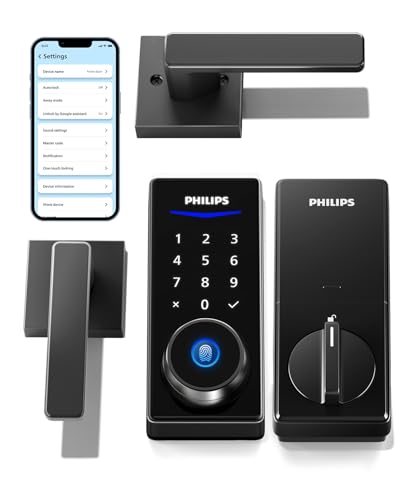
This Philips kit includes two lever handles paired with the smart lock, offering multiple unlock methods: fingerprints, PIN codes, keys, and app control. The design supports convenient, keyless entry and a coordinated look with the handles. Bluetooth enables smartphone access when within range, and a compatible Wi‑Fi gateway lets you remotely manage permissions, monitor unlock records, and control the lock from anywhere via the Philips Home Access app.
Philips Wi‑Fi Smart Deadbolt Lock With Handle Set

This Philips deadbolt door lock with handle set supports five unlocking methods: fingerprint, app control, passcode, mechanical key, and voice commands via Alexa or Google Assistant. The built‑in Wi‑Fi eliminates hub requirements, enabling remote operation and permission sharing through the Philips Home Access app. It supports rapid fingerprint unlocks (up to 0.3 seconds) and stores up to 20 fingerprints, aligning with busy family households or small offices seeking fast, secure access with minimal fuss.
Buying Guide: Key Purchase Considerations
- Unlock methods: Consider whether you prefer a combination of biometrics, codes, and app access, and whether voice control is important for your routine.
- Connectivity: Evaluate whether a hub or gateway is required for remote control. Wi‑Fi‑enabled locks are convenient but may depend on home network reliability.
- Security features: Look for anti-peep keypad designs, AES encryption, tamper alerts, and robust fingerprint recognition or fast unlock times.
- Power and maintenance: Check battery life expectations, ease of battery replacement, and battery type (AA or rechargeable). Consider backup mechanical keys for outages.
- Installation compatibility: Review door thickness, latch compatibility, and whether the lock is designed for lever handles, knobs, or both. Some sets include handles, which affects aesthetic and installation.
- Smart home compatibility: Confirm compatibility with your preferred ecosystem (Alexa, Google Assistant, Apple HomeKit) and whether you need a gateway to enable remote access and permissions sharing.
- Guest access management: For homes or rentals, evaluate how easily you can issue, revoke, or schedule one-time or recurring access for guests, house sitters, or service providers.
- Durability and weather resistance: If the lock sits on an exterior door, check IP ratings, corrosion resistance, and temperature tolerance to ensure long‑term reliability.
All five options provide a mix of traditional handle aesthetics and modern smart features, making it possible to balance style with practical, secure access. When choosing, align the unlock methods with your daily routines, ensure compatibility with your smart home setup, and consider whether you prefer a built‑in Wi‑Fi solution or a model that requires a gateway for remote functionality.