Best Smart Switch No Neutral for Modern Homes
Finding reliable smart switches that work in homes without a neutral wire can be tricky. This guide reviews five popular no-neutral switches from trusted brands, highlighting ease of installation, compatibility with voice assistants, and smart-home versatility. Whether you’re upgrading a single-gang wall, a two-gang nook, or an older home, these options offer a mix of bridge requirements, app control, and compatibility with Alexa, Google Assistant, and Apple HomeKit where applicable.
| Product | Brand | Key Benefit |
|---|---|---|
| Leviton No-Neutral Decora Smart Switch (DN15S-1RW) | Leviton | Requires MLWSB Wi‑Fi Bridge; voice control via Hey Google, Alexa, or Siri |
| MOES Smart Double Light Switches, 2 Gang | MOES | No hub required; supports 2.4GHz; fits limited wall space |
| MOES 2nd Gen Smart Touch Wall Switch | MOES | No neutral required; remote control via MOES app; schedules |
| Leviton Decora Smart No-Neutral Dimmer & Wi‑Fi Bridge Kit | Leviton | Starter kit for older homes; bridge enables smart control |
| Aqara Smart Light Switch (No Neutral) | Aqara | Requires Aqara Hub; Zigbee; HomeKit, Google, Alexa compatibility |
Note: The products listed here are selected for users seeking no-neutral options with varying bridge/hub requirements and ecosystem compatibility. Review wiring conditions in your home and choose a kit that aligns with your preferred voice assistant and smart-home platform.
Leviton No-Neutral Decora Smart Switch (DN15S-1RW)

The Leviton DN15S-1RW is designed for homes without neutral wiring in the wallbox and requires the MLWSB Wi-Fi Bridge to enable smart functionality. Installation is straightforward with LINE, LOAD, and GROUND connections. The device offers voice compatibility with Google Assistant, Amazon Alexa, and Apple Siri through the bridge, enabling hands-free lighting control. As a no-neutral option, it suits older wiring while delivering modern smart lighting control in compatible configurations.
MOES Smart Double Light Switches (2 Gang)

This 2-gang MOES switch supports 2.4GHz Wi‑Fi and does not require a hub. It enables on/off control for two fixtures from a single wall plate, fitting most wall boxes due to its shallow design. Both no-neutral and neutral wiring methods are supported, expanding compatibility across many existing wiring configurations. It’s a practical upgrade for spaces where two separate lighting circuits share a single switch plate.
MOES 2nd Gen Smart Touch Wall Switch

MOES’ 2nd Gen touch switch provides 2.4 GHz Wi‑Fi connectivity with no neutral required, supporting remote control via MOES app and basic voice control through Alexa and Google Assistant. It emphasizes flexible wiring with or without a neutral connection and includes scheduling features to automate lighting. The switch’s design aims to blend with standard wall aesthetics while delivering modern automation capabilities. It’s suitable for single-pole setups in spaces where a quick upgrade is desired without extensive rewiring.
Leviton Decora Smart No-Neutral Dimmer & Bridge Kit

This Leviton kit targets older homes lacking neutral wiring, pairing a dimmer (DN6HD) with a Wi‑Fi bridge (MLWSB). The bridge plugs into a wall outlet for power and enables smart control via popular voice assistants. It supports line, load, and ground connections for installation. The kit extends the Leviton no-neutral platform to dimming capabilities, offering a practical upgrade path for existing lighting without a full rewire.
Aqara Smart Light Switch (No Neutral)
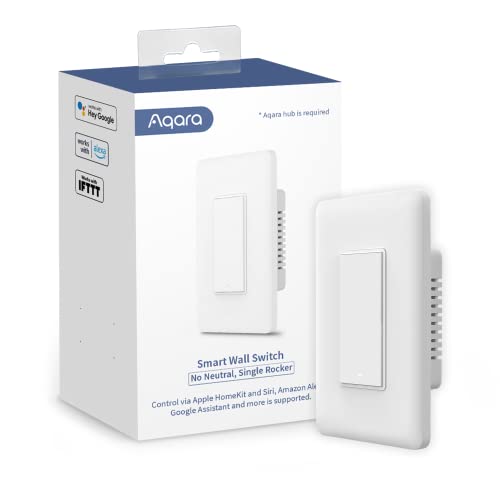
The Aqara no-neutral Zigbee switch requires an Aqara Hub, connecting through Zigbee to form a broader smart home setup. It supports HomeKit, Google Assistant, and Alexa, provided the appropriate hub and ecosystem are in place. The device enables remote control, scheduling, and scenes via the Aqara Home app, allowing integration with other Aqara devices and compatible platforms. It’s well-suited for users already invested in Zigbee and Apple’s ecosystem who want a compact, hub-centric solution.
Buying Guide: Key Considerations For No-Neutral Smart Switches
- Wiring compatibility: No-neutral switches are designed for older homes. Confirm whether your wall box has a neutral conductor and if a bridge or hub is required for full smart features.
- Bridge or hub requirements: Some models operate standalone with built-in connectivity, while others rely on a separate bridge (e.g., Leviton MLWSB). Consider placement, power availability, and the number of devices in your network when choosing.
- Voice assistant ecosystem: Check compatibility with Alexa, Google Assistant, and HomeKit. Some products offer broad support directly, others rely on a bridge or app ecosystem.
- Wiring options: Many switches support both neutral and no-neutral wiring. If your wiring is uncertain, choose models that explicitly support both to maximize compatibility.
- Dimming capabilities: If you need dimming, confirm compatibility with your light types and whether the switch supports dimming without a neutral or only with a bridge.
- Installation space: Some devices are shallow or single-pole only, which matters in tight wall boxes. Review the product’s wall depth and gang compatibility before purchasing.
- App and automation: Look for scheduling, scenes, and geo-fencing features. An intuitive app and reliable routines can significantly boost daily convenience.
- Security updates and support: Prefer brands with ongoing firmware updates and reliable customer support to ensure long-term security and performance.
When selecting a no-neutral smart switch, weigh your current home wiring, desired voice assistant, and whether you’re willing to use a bridge or hub. The options above provide a range of installation profiles—from bridge-reliant and dimming-capable to hub-free, multi-gang configurations—so you can tailor a setup that aligns with your smart-home goals.