Best Swing Arm TV Mounts for Flexible, Space-Saving Viewing
Looking for a swing arm TV mount to place in a corner, pillar, or tight living room nook? This guide highlights top full-motion, long-arm options ideal for 23–75 inch screens. Each pick is evaluated for reach, tilt, swivel, VESA compatibility, and mounting practicality so you can match the mount to your TV size and room layout. Best for: corner seating, multi-room viewing, heavy TVs, and installations on solid walls or pillars.
The following picks target common buyer needs: maximum extension for corner viewing, wide VESA support, sturdy construction, and flexible positioning without wall clutter. Use the quick reference table to compare what each product brings to your setup.
| Product | Best For |
|---|---|
| monTEK Long Arm TV Wall Mount | Long reach, corner viewing, up to 77 lbs |
| Pipishell Full Motion Wall Mount | Flexible height adjustments, wide TV range |
| MOUNTUP Long Arm Wall Mount MU0047 | Extra-long extension, single-stud easy install |
| BONTEC Heavy Duty Wall Mount | Very long arm, large TVs up to 275 lbs |
| USX MOUNT Long Arm Wall Mount | 29″ extension, versatile tilt and rotation |
monTEK Long Arm TV Wall Mount for 23–65 Inch TVs
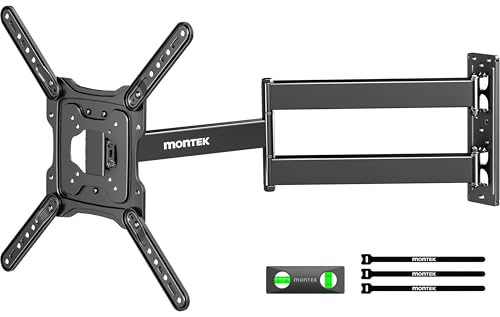
The monTEK model offers a 29″ extension from the wall, retracting to 2.1″ for space-saving storage. It supports TVs with VESA 75×75 mm to 400×400 mm and up to 77 lbs. The mount provides a 180° swivel and tilt adjustments (+/-), plus level fine-tuning after installation. Best for: corner setups or rooms where viewing from multiple spots is desirable. Limitation: ensure wall structure is solid enough (not drywall-only) and verify TV weight and VESA before purchase.
Pipishell Full Motion TV Wall Mount for 26–65 Inch TVs

This mount fits most 26–65″ TVs up to 77 lbs with VESA patterns from 100×100 to 400×400 mm. It offers three height levels after installation, +5°/-15° tilt, and +/-90° swivel, with an arm extension of about 19.5″ and a compact 3.5″ retraction. Best for: flexible living-room viewing from multiple angles. Caution: verify VESA pattern and weight for your specific TV model before purchasing.
MOUNTUP Long Arm TV Wall Mount MU0047

MU0047 provides a 37.4″ extension with a 2.6″ wall return and a dual-folding arm for flexible positioning. It supports TVs 26–65″ with VESA patterns up to 400×400 mm and up to 77 lbs. Best for: rooms needing extreme reach to accommodate sofa- or bed-side viewing. Limitation: longer arms may require careful cable management and a sturdier wall.
MOUNTUP Corner TV Wall Mount MU0057

This corner-friendly unit fits 26–65″ TVs with VESA up to 400×400 mm and extends about 30″ with a 2.6″ wall retraction. It features +/-90° swivel and +5°/-15° tilt plus a slight level adjustment after installation. Best for: a space-saving corner mount where you want room-to-room viewing. Limitation: check clearances in tight corners to ensure full arm movement is unobstructed.
BONTEC Heavy Duty Wall Mount with Extra Long Arm
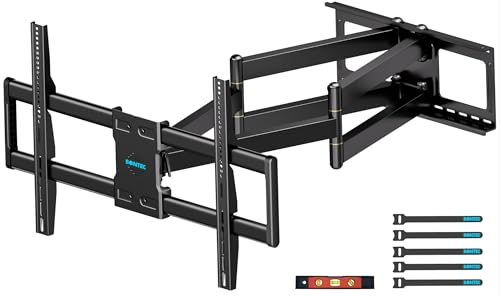
This heavy-duty option extends 3.5″ to 40″ and supports 60–110″ TVs with VESA patterns from 300×200 mm to 800×600 mm, holding up to 275 lbs. It offers +/-55° swivel, +5°/-10° tilt, and +/-4° level adjustment. Best for: large-screen setups requiring a very long arm and robust load capacity. Caution: verify the specific VESA pattern compatibility, especially on very large TVs.
Buying Guide
What to consider before buying a swing arm TV mount
- TV size and weight: Ensure your TV falls within the mount’s supported range and weight limit.
- VESA compatibility: Check the mounting pattern on the back of your TV (e.g., 100×100, 400×400).
- Wall type and studs: Most mounts require solid studs, concrete, or brick. Avoid drywall-only mounting unless specified.
- Extension reach: Longer arms increase viewing flexibility but require proper space and cable routing.
- Movement range: Consider tilt, swivel, and level adjustment to minimize glare and find optimal angles.
- Installation complexity: Some mounts are easier on single-stud walls; others may need professional help for pillar or brick installations.
Comparison at a glance
For narrow spaces or corners, prioritize mounts with long extensions and strong tilting/swiveling ranges. For larger TVs, select models rated for heavier weights. If installation surface is a pillar or concrete, confirm compatible mounting hardware and wall anchors. A dual-arm or dual-joint design can provide smoother motion across a wide viewing area, while single-arm options are typically more compact and easier to install.
FAQ
- What is a swing arm TV mount best used for? It is ideal for corner placements, flexible room viewing, and maximizing space while keeping the TV visible from multiple seating positions.
- How do I know if my TV will fit a long-arm mount? Check TV size, weight, and VESA pattern; ensure the arm’s extension and range won’t hit obstacles.
- Can I mount on a pillar or concrete wall? Yes, many models support concrete and brick; verify included hardware and wall anchors for your wall type.
- Is professional installation necessary? It depends on wall type and mounting surface; brick or pillar mounting often benefits from professional installation.
- Do long arms create instability? Reputable mounts distribute weight and use robust joints; follow installation torque specifications to maintain stability.