Best Usb Soldering Iron: Top Cordless Options for DIY and Repairs
cordless USB soldering irons have grown in popularity for small repairs, electronics tinkering, and on-the-go projects. This guide highlights five reliable models that balance portability, safety, and ease of use. Each selection supports wireless operation, adjustable temperatures, and compact design — ideal for delicate soldering tasks without heavy hardware. Read on to compare features, battery life, heat control, and practical considerations for choosing the right cordless soldering iron for your needs.
| Product | ||
|---|---|---|
| Cordless Soldering Iron Kit (Qyvorae) 1100mAh | Wide temp range with LED display | USB-C charging, 20–50 min use |
| Mini Cordless Soldering Iron Kit (Qyvorae) | Compact and portable with precise control | 1100mAh, USB-C, 20–50 min use |
| MEAKEST Portable USB Soldering Iron | Three adjustable modes, long battery life | USB powered, 20 min runtime |
| PINECIL – Smart Mini Portable Soldering Iron | Dual power inputs, rapid heat-up | USB-C PD/QC, 12-second warmup |
| Portable Soldering Iron (Qyvorae) | Three temperature levels and clear indicators | 1100mAh, USB rechargeable |
Cordless Soldering Iron Kit – Qyvorae
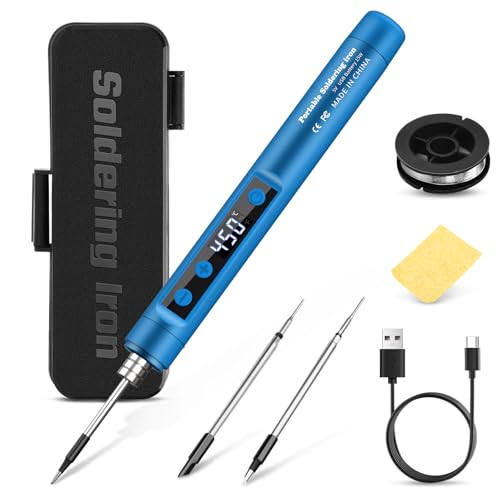
The Qyvorae cordless soldering iron combines a high-resolution LED display with a broad temperature range from 356°F to 842°F (180°C–450°C). Its built-in 1100mAh battery enables wireless operation for approximately 20–50 minutes depending on temperature settings. Type-C charging supports continued use while charging, which is convenient for extended sessions. The device emphasizes safety with surface insulation to minimize hand burns. It’s suitable for circuit boards, electrical repairs, jewelry, and metalwork small-scale tasks.
Mini Cordless Soldering Iron Kit – Qyvorae

This smaller sibling model from Qyvorae uses an intelligent temperature setting with a LED display showing the adjustable range, typically from around 500°F to 788°F (260°C–420°C). It uses an 1100mAh battery, designed for mobile use and avoiding tangled cords. Like other cordless irons, it’s best for light-duty tasks such as circuit board work, jewelry, and small repairs. The unit supports charging while in use and includes safety insulation to keep hands cool during operation.
MEAKEST Portable USB Soldering Iron

The MEAKEST cordless iron emphasizes battery life and versatility with three adjustable modes (low, medium, high). The built-in rechargeable lithium-ion battery powers the device without a cord, suitable for circuit boards, home repairs, and DIY electronics. It advertises up to 20 minutes of continuous work on a full charge, making it a good option for quick fixes or on-site work where a socket isn’t readily available. It lacks the extended runtime of some larger kits but prioritizes portability and three-temperature control for adaptability.
PINECIL – Smart Mini Portable Soldering Iron

PINECIL’s T1 Max blends dual power input options with rapid heat-up—the device reaches operating temperature in about 12 seconds. It supports USB-C for PD and QC 3.0, as well as a DC5525 jack for wired use. The combo design makes it flexible for mobile repairs or workstation use. The compact stainless-steel core and polycarbonate housing keep the tool light for precise, on-demand soldering tasks, while the gravity-sensing sleep feature conserves battery when idle.
Portable Soldering Iron – Qyvorae

This Qyvorae portable model features three distinct temperature levels, with a color-coded indicator system: green for about 620–660°F, blue for 700–750°F, and red for 800–840°F. The 1100mAh battery supports mobile use and can run about 30 minutes in low gear, 25 minutes in medium, and around 15 minutes in high. It offers a short charging time and the option to solder while charging. An automatic shut-off after 10 minutes of operation enhances safety and battery longevity.
Buying Guide: Key Purchase Considerations
When selecting a USB cordless soldering iron, consider battery life, heat control, and intended use. For small electronics, a model with precise temperature control and a comfortable grip reduces the risk of damaging delicate components. If you travel or work in tight spaces, a compact head and fast warm-up are valuable. Some models include multiple temperature modes; others rely on a single, higher setting. A quick-charge capability and the ability to operate while charging can extend work time for longer projects.
Important features to evaluate include: temperature range, response time, and tip compatibility. Look for anti-scald insulation and a safety sleep mode to prevent accidental burns. Battery type (lithium-ion) and capacity influence runtime; however, runtime varies with temperature selection and workload. Accessories like a stand, storage case, or tip set can improve usability and tip longevity. If you routinely repair PCBs or jewelry, a higher precision tip and stable temperature control become critical.
Power options are also a factor. Some devices rely exclusively on USB-C or low-power USB sources, which are fine for light-duty tasks but may limit heat output for larger components. If you expect frequent heavy use, consider models that allow optional wired operation or higher-wattage power supplies. Finally, assess build quality and ergonomics; a comfortable grip reduces fatigue during longer sessions, and a compact design minimizes fatigue during intricate work.
Summary recommendations for different needs:
– Best for portability and light repairs: models with 1100mAh batteries and quick warm-up.
– Best for precision electronics: finely tuned temperature ranges and stable control.
– Best value: devices that balance runtime, features, and accessory availability.
– Best all-around kit: a mix of cordless convenience, reliable heat, and durable tips.
Notes on Safe Use and Maintenance
Always work in a ventilated area and wear eye protection for small soldering tasks. Avoid touching the hot tip and store the iron in its stand when not in use. Regularly inspect tips for oxidation and replace them as needed to maintain heat transfer efficiency. Keep the device clean and dry to extend lifespan and ensure consistent performance across projects.