Best Wall Bracket for 55 Inch TV: Versatile Full-Motion Mounts
Looking for a sturdy wall bracket to mount a 55 inch TV? This guide highlights five solid options that fit common VESA patterns, support substantial weights, and offer helpful tilt, swivel, and extension features. Each choice targets different buyer needs—from low-profile placement to full-motion flexibility—so you can pick the best match for your room layout, viewing angle, and wall type. The products listed below are suitable for most 55 inch class televisions when the VESA, weight, and stud spacing align with the mount’s specs.
Summary table of selected products:
- Mounting Dream MD2380 — 32-65″ TVs, up to 99 lbs, max VESA 400×400, full motion
- Mounting Dream MD2380-75/75+ — 37-75″ TVs, up to 132 lbs, max VESA 600×400, low profile with tilt
- PERLESMITH Tilting TV Wall Mount — 23-60″ TVs, up to 115 lbs, VESA up to 400×400, -7° tilt
- Perlegear PGMF21 — 26-74″ TVs, up to 99 lbs, VESA 400×400, height adjustable
- Pipishell PIMF7 — 26-65″ TVs, up to 77 lbs, VESA 400×400, +5°/-15° tilt and +/-90° swivel
Mounting Dream MD2380 Full Motion TV Mount

Best for: Viewers who want strong range, easy adjustability, and compatibility with a wide TV size range. This mount fits most 32-65″ TVs up to 99 lbs and supports VESA up to 400×400 mm. It tilts up to 5° and down up to 15°, swivels left/right, and extends up to 17.5″ for flexible seating positions.
Why selected: It’s a balanced full-motion option that emphasizes a straightforward install, accessible post-install leveling, and Allen-key storage to keep tools close. The design also supports standard 16″ studs, with an included paper template to simplify alignment.
Caution: Check your TV’s VESA pattern and back clearance—extending the arm may affect wall stud space and cable routing. If your wall uses wider stud spacing (beyond 16″), consider an extended bracket if available.
Mounting Dream 37-75 Inch Universal Tilt Mount

Best for: A low-profile setup with a tilt option that reduces glare and creates a cleaner wall line. This mount supports 37-75″ TVs up to 132 lbs with VESA up to 600×400 mm and is compatible with 24″ wood studs.
Why selected: The low-profile design brings the TV nearly flush to the wall while offering tilt for glare control. It’s a practical pick when you want to maximize space without sacrificing adjustability.
Caution: Weight and VESA must align with the TV’s specs; verify that 24″ stud spacing applies to your framing and that any blocked inputs won’t interfere with mounting.
PERLESMITH Tilting TV Wall Mount

Best for: Viewers needing a strong tilt capability to reduce glare and achieve an optimal viewing angle. It fits most 23-60″ TVs up to 115 lbs with VESA from 75×75 to 400×400 mm and can be installed on 8″, 12″, or 16″ wood studs, as well as concrete or brick walls.
Why selected: It provides a robust tilt range (up to 8°) and a compact low-profile footprint, with UL-style safety notes reflected in its construction. The mount emphasizes stable loading and space-saving design.
Caution: Do not install on drywall alone; ensure solid wall backing and proper stud engagement for heavier TVs.
Perlegear Full Motion Mount For 26-74 Inch TVs
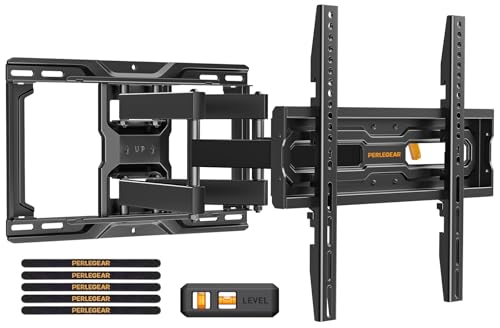
Best for: Those who want easy installation and height flexibility. It supports up to 99 lbs and VESA up to 400×400 mm, with three height configurations and 3-step installation suitable for many living rooms.
Why selected: The three height settings help align screen height to eye level, which is important for long viewing sessions and for mounting around soundbars or other equipment.
Caution: If mounting on very thick walls or unusual stud patterns, confirm compatibility and space for cable routing before installation.
Pipishell Full Motion TV Wall Mount 26-65 Inches

Best for: Viewers seeking strong extension and comprehensive motion with a sturdy build. This mount supports 26″-65″ TVs up to 77 lbs with VESA up to 400×400 mm, and offers +5°/-15° tilt plus +/-90° swivel.
Why selected: Its thicker arms and secure design provide a reliable full-motion experience, allowing smooth repositioning for seating changes or room configurations.
Caution: Confirm wall type and stud spacing; do not install on drywall-only walls without appropriate anchors or backing.
Buying Guide
Key considerations when choosing a wall mount for a 55 inch TV include TV size compatibility, weight rating, VESA pattern, stud spacing, and motion range. A clear plan for your room layout helps select the best option for glare reduction, seating orientation, and distance to the screen.
- VESA compatibility: Match the TV’s VESA pattern to the mount’s maximum pattern. A mismatch means the mount won’t align with screw holes.
- Weight rating: Don’t exceed the mount’s maximum weight. Heavier screens require sturdier mounts and secure stud anchoring.
- Stud spacing and wall type: Most mounts support 16″ or 24″ stud spacing; confirm your wall can accommodate the chosen bracket. Concrete and brick walls may require different anchors.
- Motion features: Consider tilt if glare is a concern, swivel for off-axis seating, and extension for space clearance or easier access to ports.
- Installation complexity: Some mounts include pre-assembled arms and templates; others require more DIY work. Follow included instructions and use proper tools.
Common buyer questions
- Can I mount a 55 inch TV on a full-motion bracket?
- What is the difference between low-profile and full-motion mounts?
- Should I worry about ceiling clearance if I extend the arm?
- Do I need professional installation for heavy TVs?
FAQ
- What is the maximum VESA for most 55″ TV mounts? Answer: It commonly ranges up to 400×400 mm, though some mounts support up to 600×400 mm.
- Do full-motion mounts require extra studs? Answer: They require secure mounting to wall studs or suitable anchors rated for the TV weight.
- Can I mount on brick or concrete walls? Answer: Yes, with appropriate anchors and a compatible mount.
- Is tilt important for glare reduction? Answer: Yes, tilting can reduce glare from lights or windows for a more comfortable view.
- What is the typical install time? Answer: Many mounts install in under an hour for a DIY project with basic tools.