Best Zigbee Smart Locks for Smart Homes
Finding a reliable Zigbee smart lock can simplify access control while ensuring strong security for modern homes. The following picks integrate with Zigbee hubs and popular ecosystems like Apple HomeKit, Google Home, Alexa, and IFTTT. This guide reviews five top options, highlighting unlock methods, integration capabilities, and key features to consider when upgrading your front door security.
| Product | Key Benefit | Platform Compatibility |
|---|---|---|
| Aqara Smart Lock U100 | Apple Home Key, fingerprint unlock, Zigbee 3.0 | HomeKit, Google, Alexa, IFTTT |
| Kwikset Convert Zigbee 3.0 | Transform existing deadbolt into smart lock | SmartThings, Zigbee hubs |
| Yale Assure Zigbee Lock | Backlit keypad, Auto Relock | Xfinity, Echo, Zigbee hubs |
| Kwikset 914 SmartCode Zigbee | SmartKey, up to 30 user codes | Zigbee hubs |
| Aqara U50 | Apple Home Key, Matter support | HomeKit, Google, Alexa, IFTTT |
Aqara Smart Lock U100, Fingerprint Keyless Entry

The Aqara U100 offers Apple Home Key integration and a high-precision fingerprint reader supporting up to 50 fingerprints. It supports Apple Home, HomeKit, and can be controlled via Aqara Home app with a Zigbee 3.0 hub for remote password management and one-time codes. It also works with Google Home, Alexa, and IFTTT for broader smart home automations. A mechanical key remains for emergency access. The lock is IP65 weatherproof for exterior use and includes a touchscreen keypad for convenient entry.
Kwikset Convert Zigbee 3.0 Electronic Smart Lock

The Kwikset Convert kit lets you upgrade an existing deadbolt to a Zigbee-enabled smart lock. It supports integration with Zigbee hubs such as SmartThings and Echo devices. Note that you should measure your door’s backset, cross bore, and thickness to ensure a proper fit. The kit replaces the interior portion of the lock for smart access and supports remote control within a compatible smart home ecosystem.
Yale Assure Lock with Zigbee
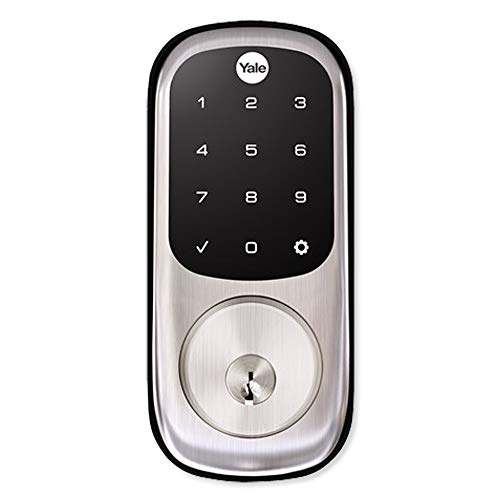
The Yale Assure Lock with Zigbee combines a touchscreen keypad with Zigbee connectivity for remote locking and monitoring. It supports auto relock and can be added to compatible hubs such as Xfinity Home and Amazon Echo devices. The backlit keypad provides easy entry in low light, and the lock can be controlled remotely if paired with a supporting Zigbee hub or alarm system.
Kwikset 914 Traditional Keypad SmartCode

Kwikset 914 SmartCode provides Zigbee 3.0 technology with SmartKey security to re-key quickly and protect against forced-entry attempts. It supports up to 30 customizable user codes and works with multiple Zigbee hubs and rings compatible ecosystems, including SmartThings and Echo devices. The device enables convenient code-based access with durability and reliable performance within a Zigbee network.
Kwikset Home Connect 620 Smart Lock

The Kwikset Home Connect 620 uses Z-Wave technology for Ring and SmartThings compatibility, expanding secure keyless entry and remote locking control. While marketed with Z-Wave rather than Zigbee, many homes use this device in mixed ecosystems. A Z-Wave hub is required to enable automation and remote access via compatible apps. The lock emphasizes ease of use with keypad entry and remote management through compatible hubs.
Aqara U50 Keyless Lock

The Aqara U50 provides Apple Home Key integration, Bluetooth, and Matter support via Aqara hub compatibility. It supports remote passwords, one-time codes, and temporary visitor access, with a focus on secure Apple ecosystem integration. It also works with Google Home, Alexa, and IFTTT through Aqara’s hub, enabling automated scenes and cross-platform interoperability. The lock is designed for robust performance in multi-protocol smart homes.
Buying Guide: Key Considerations for Zigbee Smart Locks
- Platform compatibility: Ensure the lock works with your preferred hubs and ecosystems (HomeKit, Google Home, Alexa, SmartThings, or Ring).
- Unlock methods: Look for fingerprint sensors, keypad entry, Apple Home Key, and remote/app-based access to match your daily routines.
- Security features: Evaluate SmartKey or equivalent anti-tamper protections, auto relock, and robust encryption.
- Installation and fit: Check backset, cross bore, door thickness, and whether you need to replace the interior mechanism or the entire lock.
- Local vs. cloud control: Prioritize local automations where possible for faster response and reduced dependency on internet connectivity.
- Weather resistance: For exterior doors, select IP-rated locks to withstand weather conditions.
- Future-proofing: Consider Matter support and multi-protocol hubs to preserve compatibility as ecosystems evolve.
- Firmware updates: Confirm the lock receives regular updates to address security and feature enhancements.